Teardowns

Teardown · meshgradientstudio.com

The free trial nobody sees: meshgradientstudio.com

The review gave it an A: the free editor is one click away. The goal is a sign-up, and its best offer, a week of Pro with no card, is in the last paragraph. The page never gives Pro's price either.

By Synergy · Report run November 15, 2026

The grade: A, clear
No blockers, so no points against it. Jump to the report

Mesh Gradient Studio is one of our own tools: an editor in the browser for animated gradient backgrounds, which exports images, video and code. The editor is free and needs no account. Pro costs $8 a month, $60 a year or $49 once, and every new account gets Pro free for seven days with no card. We told the plan that the goal is a sign-up, that the audience is developers, and that there are no customers yet.

It got an A. Nothing stops a visitor: "Free to start, no sign-up" sits beside the main button, and the free limits are spelled out. The trouble is that the page is so good at saying you don't need an account that it gives no reason to make one. The seven-day trial appears once, in the closing paragraph. Whether it needs a card isn't said anywhere on the homepage. Pro's price isn't either: the only way to it is a button that says "View Plans".

The plan's main fix moves three facts to where the first decision happens: the trial is free, it needs no card, and it never bills you. All three are already on our own pricing and terms pages. The homepage doesn't say them.

This is the third plan we ran, and the screenshots are why. The first time, the desktop capture timed out and the plan was written from the phone alone. Then we made every capture wait a few seconds for the page to draw. That fixed another site and broke this one: its background never stops moving, and a capture that waits for it never comes back. The capture now takes the picture straight away and waits only when the first one comes back blank. This plan has both screenshots.

One line to read with care. The plan suggests a button reading "Pro from $5/month or $49 once". The $5 is the yearly plan, $60, spread over twelve months. Paid monthly it's $8, as the plan's own FAQ says. We left it all as it came out.

What to check on your own site

The report gave meshgradientstudio.com an A (0 points from conversion blockers; how the grade works). These are the findings most homepages share.

  1. 1

    Put your best offer where people decide

    A week of Pro, free, with no card is the strongest thing this page can say to someone it wants to sign up. It's in the last paragraph, after most visitors have clicked "Open Editor" and left the homepage for good. The plan puts it under the first button. Find the one offer you'd most want a new visitor to hear, and check how far down the page it is.

  2. 2

    Say the trial's terms, not just its length

    "New accounts get 7 days of Pro" leaves the question every developer asks: will it charge me? The answer here is no card and no automatic charge. It's written on the pricing page and in the terms, where nobody deciding on the homepage will read it. If your trial is safe, say so in the same sentence that offers it.

  3. 3

    Don't make people click to see a price

    The homepage says what Pro adds several times and never what it costs. "View Plans" could lead to a few dollars or a few hundred. The plan puts the price on the button. If your price is one you're happy with, a visitor should never have to go looking for it.

The report, as it came out

Everything above "Growth Plan" is in the free report. Nothing below is edited. A line in [brackets] is the plan asking the owner for something it couldn't find on the site. The AI wrote the report; the lessons above are where a person read it and decided what mattered, which is how Site Checkups is meant to be used (you're the judge).

Site Checkups report

meshgradientstudio.com

Clear

The page makes trying the editor free and instant; the main pause is not knowing what Pro costs or who else relies on it.

No blockers, so no points against it. Nothing on this page stops people from buying, but 7 things make people hesitate. The grade counts blockers only.

Fix these first

In order. Each one keeps its number where it appears in the report.

  1. Fix first, number 1Trust gapThere are no user counts, testimonials, or named sites using the embed, so the "Community gallery" and "Webflow, Framer, WordPress" mentions don't show anyone actually relying on it.
  2. Fix first, number 2Button problem"View Plans" tells the visitor nothing about what they'd find, so people curious about Pro have no hint whether it's a cheap upgrade or a costly subscription.
  3. Fix first, number 3Hesitation“How much is Pro, and is it monthly?” The page lists what Pro adds several times but never gives a price, only "View Plans".

Conversion blockers· 0

Nothing here stops someone who came to buy

The grade comes from these alone, each weighted from 1 (minor) to 5 (critical).

None found. Nothing on this page should stop someone who came to buy.

How your page reads

What a first-time visitor takes away

To a first-time visitor

A visitor sees a free, browser-based gradient maker that exports video and code without an account. It feels low-risk and specific. The only reason to leave early is if they just wanted a static gradient and see this as more tool than they need.

In the first five seconds

Free animated gradient generator in the browser, exports PNG, MP4 and code, no sign-up.

What visitors think you offer

A free online tool for making moving mesh gradients for websites and social video.

What you actually offer

A freemium browser editor with 15 styles, 8 layers and 5 export formats; free covers PNG, CSS and 5-second 720p clips, Pro adds 4K, 30-second video, 4x PNG and GLSL, with a 7-day Pro trial, plus a community gallery and a free Chrome new-tab extension.

What's working· 3

Keep these as they are

  • "Free to start, no sign-up" and "No account needed" remove the usual reason to bounce from a free tool, right next to "Open Editor".

  • The free limits are spelled out plainly ("Free clips run 5 seconds at 720p. Pro goes to 30 seconds at 4K"), so nobody gets surprised mid-export.

  • The "Try a palette" and "Open this one in the editor" path drops visitors straight into a working example instead of a blank canvas.

Visitor hesitations· 3

Pro's price and the trial terms stay unclear on the homepage.

  • Fix first, number 3How much is Pro, and is it monthly?

    The page lists what Pro adds several times but never gives a price, only "View Plans".

  • Will the 7-day Pro trial ask for my card?

    "new accounts get 7 days of Pro" doesn't say whether it auto-bills when it ends.

  • Can I use these in client or commercial work?

    Licensing for exported gradients and videos isn't mentioned in the homepage text, only hinted at under "Questions?".

Trust gaps· 2

No outside voices vouch for the tool.

  • Fix first, number 1

    There are no user counts, testimonials, or named sites using the embed, so the "Community gallery" and "Webflow, Framer, WordPress" mentions don't show anyone actually relying on it.

  • The Chrome extension link carries no rating or install count in the text, so a visitor weighing a browser extension has nothing to judge it by.

Button problems· 2

The trial offer and "View Plans" sit apart and read vaguely.

  • Fix first, number 2

    "View Plans" tells the visitor nothing about what they'd find, so people curious about Pro have no hint whether it's a cheap upgrade or a costly subscription.

  • The 7-day Pro trial appears only in the closing "Ready to create?" line, so visitors who click "Open Editor" earlier may not know signing in gets them Pro features.

The paid part

Growth Plan

$19, one-time, for one site. Shown here in full. Before it's written you answer five quick questions, so the plan fits your business. Here's what we answered:

  • Goal: sign up or start a trial
  • Visitors a month: under 500
  • Customers so far: none yet
  • For: developers
  • Avoid: anything that needs a name or a face (we stay anonymous)
  • Avoid: big changes (little time)
  • Avoid: paid ads

Facts also taken from the site's own pages: /help, /pricing, /terms

Start here

Put the trial terms and Pro price next to the first Open Editor button

  1. Under the hero's "Open Editor" button, replace the "Free to start, no sign-up" line with: "Free forever, no sign-up. Sign in for 7 days of Pro free, no card, and it never bills you."

  2. Rename the bottom "View Plans" button to "Pro from $5/month or $49 once" (prices from the pricing page).

  3. In the closing "Ready to create?" paragraph, add: "The trial needs no card and drops back to Free on its own."

  4. Add one line under the "MP4 video" card: "Everything you export is yours to use in client and commercial work." (from the pricing page and terms, section 3).

Why this first

You want sign-ups and have none yet. The trial is your sign-up offer, and right now it's buried in the last paragraph with no word on cards or billing. Developers assume a trial means a card and an auto-charge. Your pricing page already says it doesn't, so say it where they decide.

Quick wins· 5

Change these words

  • Hero pill badge

    Now

    15 styles | Layers and blend modes | Free to start, no sign-up

    Change to

    15 styles | Free to start, no sign-up | 7 days of Pro free, no card

    The trial is your conversion goal, and right now it only shows up in the last section. The pricing page confirms no card is needed and that the trial drops to free on its own.

  • Closing "Ready to create?" paragraph

    Now

    PNG, CSS and short MP4 clips are free, and new accounts get 7 days of Pro.

    Change to

    PNG, CSS and short MP4 clips are free. Make an account and get 7 days of Pro (4K video, no watermark): no card needed, and it switches back to free on its own.

    This answers the "will it bill me?" worry with facts taken from the pricing page and terms.

  • Closing section secondary button

    Now

    View Plans

    Change to

    Pro from $5/month or $49 once

    Developers hate clicking just to find a price. The pricing page publishes these figures, and $49 once is a strong hook for that crowd.

  • "Export for the web" card

    Now

    PNG at 1x or 2x, CSS, or an HTML embed that runs live on your site. Pro adds 4x PNG and GLSL shaders.

    Change to

    PNG at 1x or 2x, CSS, or an HTML embed that runs live on your site. Pro adds 4x PNG and GLSL shaders. Everything you export is yours to use in commercial work.

    It answers the licensing question developers ask before shipping something in client work. The wording comes from the terms page.

  • "MP4 video" card

    Now

    Free clips run 5 seconds at 720p. Pro goes to 30 seconds at 4K.

    Change to

    Free clips run 5 seconds at 720p, watermarked. Pro goes to 30 seconds at 4K, no watermark. Try it free for 7 days.

    The watermark is the most concrete thing Pro removes, and the pricing page lists it. Naming it here, next to the trial, gives people a reason to sign up at the moment they want it.

What visitors see first

Your page before anyone scrolls, on a desktop and a phone

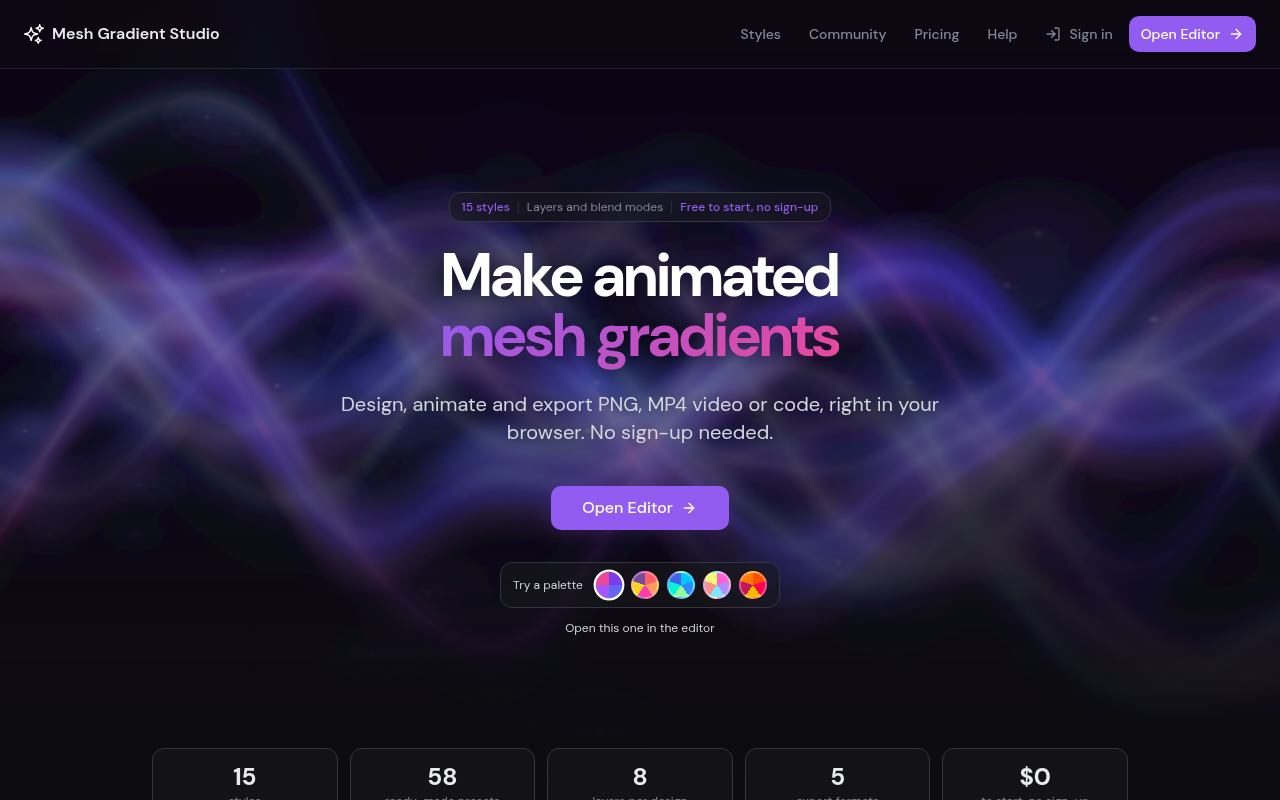
meshgradientstudio.com on a desktop screen, as it first loads
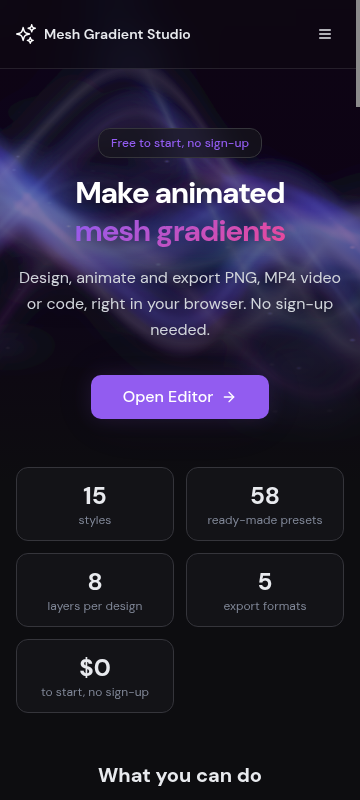
meshgradientstudio.com on a phone, as it first loads

On a desktop

Clear and fast. The headline "Make animated mesh gradients" with the gradient-colored second line grabs the eye first, the subline names the exports, and the purple "Open Editor" button sits dead center with a second one in the nav. The palette picker gives a one-click start. What's missing for your goal is any hint that signing up gets you 7 days of Pro free. The only sign-up cue is "Sign in", which reads as "for people who already have an account". The stat cards are cut off at the bottom edge, so their labels are unreadable.

On a phone

Works well. Badge, headline, subline and "Open Editor" all fit above the fold, and the button is big and easy to tap. The five stat cards take up the bottom half and leave the $0 card alone on its own row. The palette picker from desktop doesn't show here. There's no mention of the trial, and no sign-in or sign-up control outside the hamburger menu.

  1. 1

    Hero pill badge (desktop)

    "Free to start, no sign-up" is the only offer line up top. It pushes people away from making an account, which is the action you want. Nothing up here mentions the 7-day Pro trial.

    Fix: Keep the no-sign-up promise in the subline. Change the third segment of the pill to the trial: "Free Pro for 7 days, no card".

  2. 2

    Stat cards under the hero (desktop)

    The row is cut off at the fold, so the visitor sees big numbers (15, 58, 8, 5, $0) with half-hidden labels. It looks unfinished.

    Fix: Cut about 60px of padding between the "Open this one in the editor" line and the stat row so the labels clear 800px. Or move the row down so it doesn't touch the fold.

  3. 3

    Stat cards (phone)

    Five cards in a two-column grid leave "$0" alone on its own row. Together they push the content below the fold, and they repeat what the badge and subline already say.

    Fix: Drop the "$0 to start" card on mobile, since the badge already says it. That leaves a tidy 2x2 grid.

  4. 4

    Nav "Sign in" (desktop)

    New visitors have no account, so "Sign in" doesn't invite them to make one. The trial path stays invisible.

    Fix: Rename it "Sign up free", or add "Start free trial" next to it as a plain text link.

Hero options· 3

Three ways to write the top of the page

  • Code you can ship

    Animated mesh gradients, exported as code

    Design in the browser, then export CSS, a live HTML embed, PNG or MP4. No sign-up needed. Start a free account for 7 days of Pro: 4K video, GLSL shaders, no credit link.

    Open the editor, free

    Use this when most of your visitors are developers who care more about the export than the design tools.

  • Trial with no catch

    Make animated mesh gradients. Try Pro free for 7 days.

    No card needed, and it drops back to the free plan on its own when the week ends. After that, Pro is $49 once or $8 a month.

    Start my free Pro week

    Use this when sign-ups are the goal and you want the no-card trial and the price to answer the two biggest doubts up front.

  • Skip the blank canvas

    A moving gradient background in five minutes

    Pick one of 15 styles or 58 presets, drag the colors on the canvas, and paste the embed into Webflow, Framer or WordPress. Free in your browser, no account.

    Open Editor

    Use this if visitors are bouncing because the tool looks like more work than they wanted.

Button and link text· 5

What each button should say

  • Hero, main button

    Open EditorOpen the editor, free

  • Top navigation, right side

    Sign inSign in / Try Pro free

  • "Ready to create?" section, second button

    View PlansSee Pro: $49 once or $8/mo

  • "Ready to create?" section, main button

    Open EditorOpen the editor, no account

  • "A new gradient on every new tab" section

    Add to ChromeAdd the free extension to Chrome

The checklist

What to do this week, and what comes next

This week

  • Add a "Sign in to save" nudge to the "Layers and blend modes" card: "Built something you like? Sign in to save it and get 7 days of Pro, no card."

    Low effort Medium impact

    Saving is the one thing that needs an account. Tying the trial to the moment someone wants to keep their work gives developers a concrete reason to sign up.

  • Lead the "Export for the web" card with the developer exports: "CSS, a live HTML embed, or GLSL shader code (Pro). Paste it straight into your project."

    Low effort Medium impact

    Your audience is developers, but GLSL is mentioned last as a Pro add-on. Code output is what makes this tool theirs, so it should come first.

  • Tell visitors the four newest styles go free on November 20: "Lava Lamp, Liquid Chrome, Holographic and Retro Grid export free from November 20. Pro users have them now."

    Low effort Low impact

    It's four days away and only on the help page. It shows the tool ships, and it gives a real reason to try Pro today.

Next

  • Swap the "58 ready-made presets" stat for real usage once you have it, e.g. "[number] gradients exported this month" or the Chrome extension's install count and rating near "Add to Chrome".

    Low effort Medium impact

    With no customers, the honest proof is what the tool itself does. A live export count needs no names or faces, so it fits staying anonymous.

  • Show two or three real community gallery gradients on the homepage with their vote counts, each with "Open this one in the editor".

    Medium effort Medium impact

    The "Community gallery" card claims people are making things but shows none. Real work from strangers proves it gets used, and remixing pulls people into the editor.

  • Post one short guide aimed at developers, "Add an animated gradient background to a Next.js or React site in 2 minutes", and link it from "Put it on your website".

    Medium effort Medium impact

    It meets developers where they search, without paid ads, and walks them to the embed and the Pro credit-link upgrade.

In your account you tick these off as you go, and your dashboard shows your progress and the next fix.

Then, a free re-check

Within 30 days of buying, run one free re-check. We read the page again and tell you what's fixed, what's still open and anything new, with the number of conversion blockers before and after. You can also copy the whole plan as text, save it as a PDF, and we email you a copy.